
Should We Use It? Unpacking Shamel Studio's Budgeting & Scheduling Software
A new column exploring new tools & software for the FilmStack Community

PRESENTED BY



When Ted approached me to write reviews of software and gear for Hope for Film I was floored. I’m a huge film nerd who loves software and gear just as much as the movies they help create. I’m always tinkering with new gear, trying new software, and looking for the next thing that’ll help me make movies better and cheaper. When Sammy from Shamel Studio reached out to me about giving their scheduling and budgeting software a spin I immediately responded saying that I’d love to.
I’ve been a dedicated user of Jungle Software (Gorilla Budgeting & Scheduling) for quite a while now, and even though I’ve tried many different budgeting and scheduling programs I always find myself back in the jungle. With that said, I’m always down to try something new in hopes that it’ll make my life easier and in turn, my films better. So let’s get into Shamel Studio.
Shamel Scheduling
Most scheduling software wants to import your script using their proprietary format or a Final Draft file. Shamel works with Final Draft as well, but where it differs is its PDF import. When I import a PDF into Gorilla it doesn’t give me the same breakdown that it would with a final draft file. This makes sense because when you use Tagger in Final Draft to breakdown your script and tag your elements, those elements are imported into Gorilla, Studio Binder, Movie Magic, or Shamel Studio so that you don’t have to do that work all over again. However, if you’re importing a PDF most of the elements aren’t imported into whatever software you’re using. Until Shamel Studio.
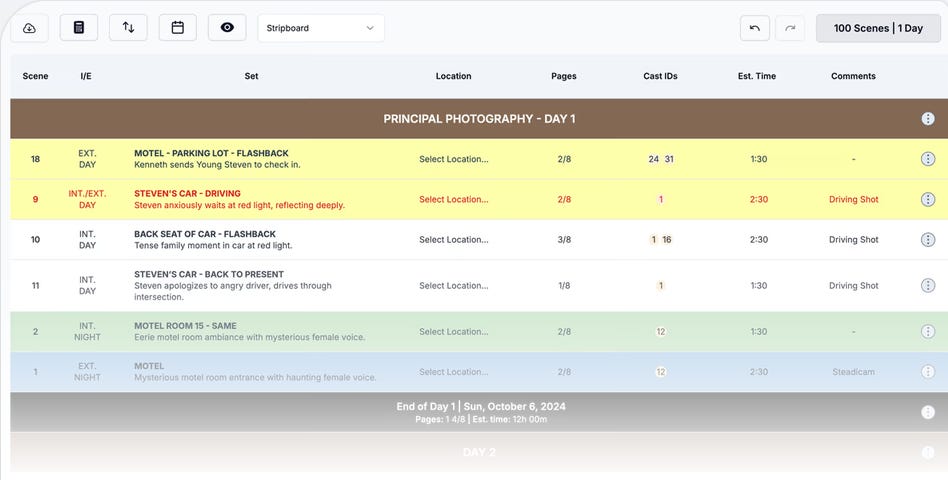
Shamel Studio automatically detects and identifies cast, props, locations, wardrobe, and most other elements when importing a PDF. It not only identifies these elements, it does it pretty well. It’s not perfect, but I was able to go into the scene breakdown sheets and tag any elements the software missed in no time at all. If someone had told me there was software that would cut my breakdown time in half I don’t think I’d have believed them, but Shamel Studio changed the game for me for breakdowns. Another cool feature is that the script page can remain visible while you’re tagging elements, making it easier to get the job done without mistakes.
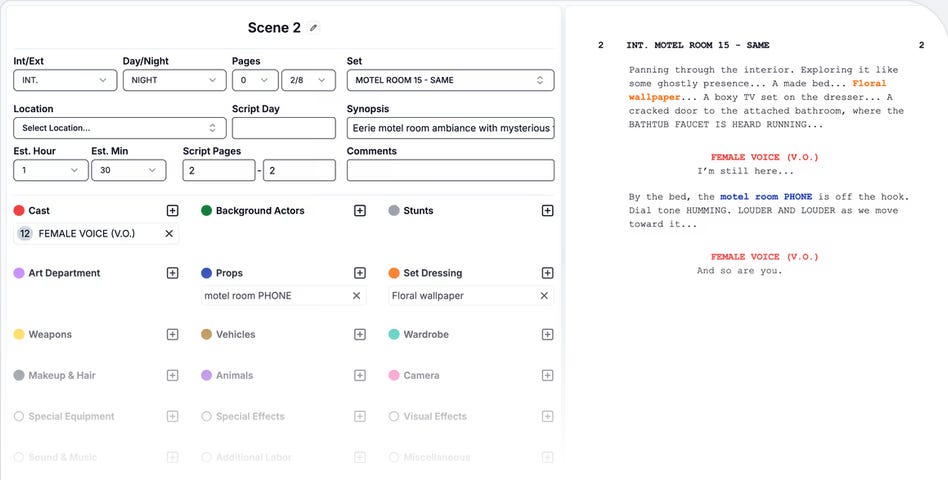
When it comes to building a schedule, Shamel Studio does this in a pretty standard way. It puts it together in a similar way to other scheduling software, laying out your scenes, labeling them day or night, and importing the information from your breakdown. Where it shines though is in the convenient AD style format of drag and drop workflow of the stripboard. While this feature is available in most scheduling software it’s not as intuitive as it is in Shamel Studio. Here it just looks like a standard stripboard schedule, and you’re able to add day breaks, and customize stripboard columns in an easy and intuitive way.
A MESSAGE FROM OUR SPONSOR

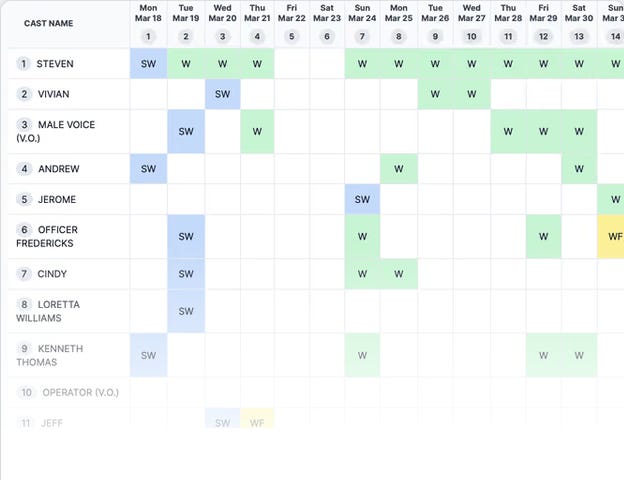
The schedule also has a fantastic calendar view so that you can visualize the production schedule by shoot date. DOOD (day out of days) forms are
automatically created and cast and crew work days, including hold days are already there. Sure, you may need to tweak some days here and there, but it’s so easy it almost feels like cheating. Shamel Studio also automatically detects availability or schedule conflicts by throwing up a “red flag.” This is extremely helpful and aids in faster scheduling.
Element management in Shamel Studio allows users to track where elements occur, merge duplicates, renumber IDs, and organize the master element list. These are standard tasks in scheduling software, but Shamel Studio makes it so easy it almost feels like I’m living in a simulation. After just a few hours using the software it feels like I’ve been using it for years. It’s that intuitive. Add public schedule sharing so your collaborators can view your stripboard, calendar, or DOOD reports without anyone needing a Shamel Studio account and you’ve got some serious indie film power at your fingertips.
Of course, you can export PDF reports and schedules as well. After a month of using Shamel Studio I’m still blown away by how easy it made my job. Now, let’s get into the budgeting portion of Shamel Studio!
Shamel Budgeting
The first thing that sets Shamel Studio’s budgeting apart is that it builds the initial budget from your schedule instead of treating budgeting and scheduling as separate processes. This took me a bit to get used to, but it didn’t take long for me to realize how much time it saves. When you first create a budget it allows you to pick a schedule to build from, and the software builds a budget from there. It asks a few questions first, like how many shoot days, and what budget number are you looking to hit. Once you input those variables it spits out a budget for you complete with account numbers, departments, and everything in between.
When I first started using the software I got a little miffed by the budgeting portion of the software because it didn’t understand the type of producer I am. You see, if I told the software I was making a film for $70,000 it would make me a schedule with a final budget of around $250,000. It couldn’t understand that maybe I own my own gear or will only shoot with 5 to 10 crew members. With that said it still did a great job building the schedule and saved me a little time, even though I had to go in and remove things and reduce rates to meet my original budget number.
A MESSAGE FROM OUR SPONSOR

I told Sammy at Shamel Studio about my issue and a few weeks later I got an email telling me that they worked on the issue I was having and told me to give it another test drive. This time the software understood the assignment. Granted, I still had to go in and adjust some numbers, but it cut my time down significantly. I’d say that with the new tweaks my work time was cut by about 60%.
The software automatically imports cast, locations, and production elements, making it easier when you’re crunching numbers. It also automatically adds guild and union tiers and rates, and auto fills fringes and state tax credits and incentives. I can’t express how much time this saves. Sure, some of the other software packages do this too, but not in such an intuitive way. Setting up globals in Shamel Studio opened up features that I hadn’t thought possible with such ease. If I set globals for everything, then I’m able to try new budget scenarios and my budget numbers change accordingly. This means I can generate three different budgets from one budget in minutes.
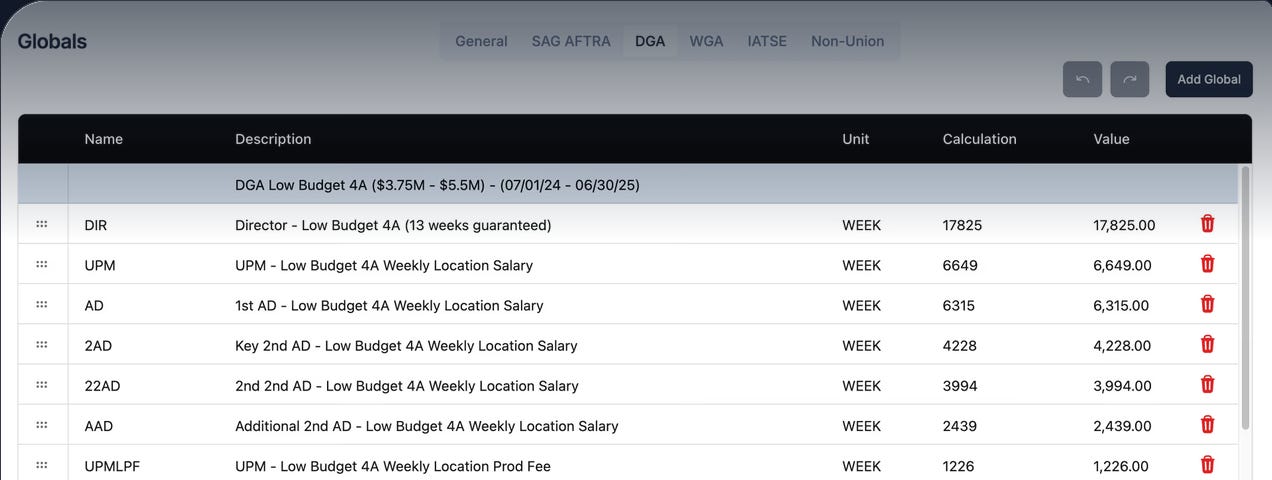
Shamel Studio also has dynamic union tiers so you can change tiers after completing a budget to compare different scenarios. It can also change crew configurations, adding or removing crew before generating the budget so that you can see the budget respond to those choices. And just like the scheduling side of the software it’s easy to generate budget reports.
There’s also an optional callsheets side to the program that works just as intuitively as the rest of the software. Shamel Studio also offers 50% off for any students with a valid school email address. It’s difficult for me to put into words how much of a game changer Shamel Studio is for me as an independent producer. I never thought I’d do this, but I canceled my Jungle Software subscription and have completely switched over to Shamel Studio. Sammy and his team haven’t just created a great software package, they listened to producers, line producers, and ADs and created something that feels like it was made specifically for them.
The only thing I’d like to see in the future is more integration with micro-budget film budgets, although I understand why it works the way it does. This software cut down my work time by such a huge percentage I was able to focus on other important tasks. If you’re an independent producer I’m not sure there’s a better software option out there. If you know of one, then let me know because I’d like to try it.
Shamel Studio has also created this tutorial if you’d like to explore further.
 | A guest post by
|